Published on 1ST SEP 2024
Railway System
PrivateFully autonomous model railway system with real-time train detection, distributed Rust microservices in Docker, and custom embedded hardware for DCC train control. University project at the Chair of Real-Time Systems, RPTU Kaiserslautern-Landau.
The Project
The Railway System is a university project developed at the Chair of Real-Time Systems at RPTU Kaiserslautern-Landau. The goal is to build a fully autonomous miniature railway system in which trains operate without any manual driving. The software handles everything: based on real-time sensor data, the system decides which trains should stop, which should move, and when track turnouts should switch, closely mimicking how a real-world dispatching system operates.
At the physical level, the system uses Märklin H0 scale model trains running on a C-track layout, with DCC (Digital Command Control) as the communication protocol between the central controller and the trains. Sensors embedded along the track detect train positions in real time, and that data feeds into a distributed software system running in Docker containers that orchestrates all control decisions automatically. The result is a closed-loop real-time system: trains move, sensors fire, software decides, hardware responds.
This is an ongoing project. The core system is functional but further improvements and features remain in progress. It was initiated by the Real-Time Systems department, not by me personally, though I was responsible for significant parts of the design and implementation. The repository is private and cannot be shared directly.
Hardware
The physical system is composed of several layers of hardware that work together: the model trains and track, a central track controller, train detection microcontrollers with sensors, and custom-built electronic circuits for turnout control. Each layer was selected or designed to meet the real-time and reliability requirements of the system.
01. Märklin H0 Trains & C-Track

The trains used in this project are Märklin H0 scale models, specifically the ICE 2 (model 29792). These are digitally equipped locomotives that support the DCC protocol among others (mfx, MM). In DCC mode, the factory-assigned decoder address is 3, which is what the software system uses to issue speed, direction, and function commands. The onboard decoder automatically detects the operating protocol and rectifies the track signal internally to power the motor and electronics.
The track is Märklin C-Track, which uses a three-rail configuration. The two outer rails are electrically connected together and form the return path (common). The center rail, a row of metal contact studs running down the middle of the track, carries both the power supply and the digitally encoded DCC command signal simultaneously. Although the waveform alternates polarity and resembles AC, it is actually a digitally modulated signal: the voltage transitions encode command bits that the onboard decoder interprets. Each locomotive picks up the center rail signal via a contact shoe underneath the chassis.
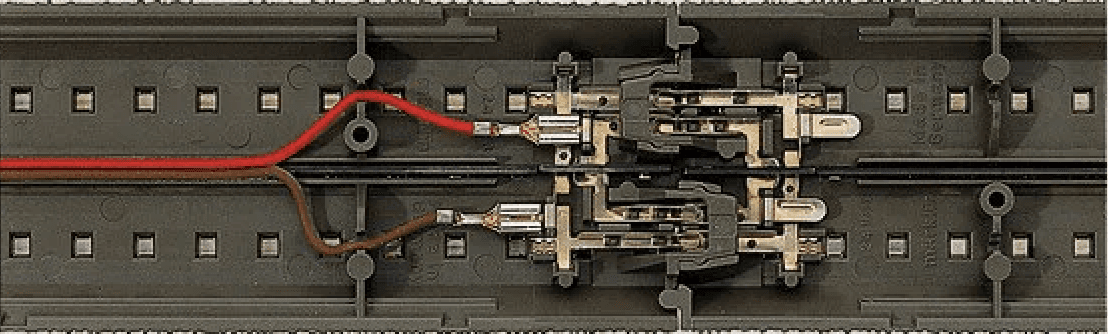
The system operates at 12V, which is the minimum for DCC operation on this track (the nominal recommended voltage is 16V). The three-rail design simplifies wiring considerably: reverse loops require no polarity switching, and multiple trains can share the same track section independently.
- Märklin ICE 2 H0 scale model, DCC address 3, supports mfx / DCC / MM protocols
- Three-rail C-track: outer rails = common return path, center studs = power + DCC signal
- Digitally modulated waveform: voltage transitions encode DCC commands, not true AC
- Operating voltage: 12V (DCC minimum); nominal 16V recommended
- Onboard decoder rectifies and regulates track signal to power motor and electronics
- Reverse loops require no polarity switching due to three-rail design
02. Main Track Controller
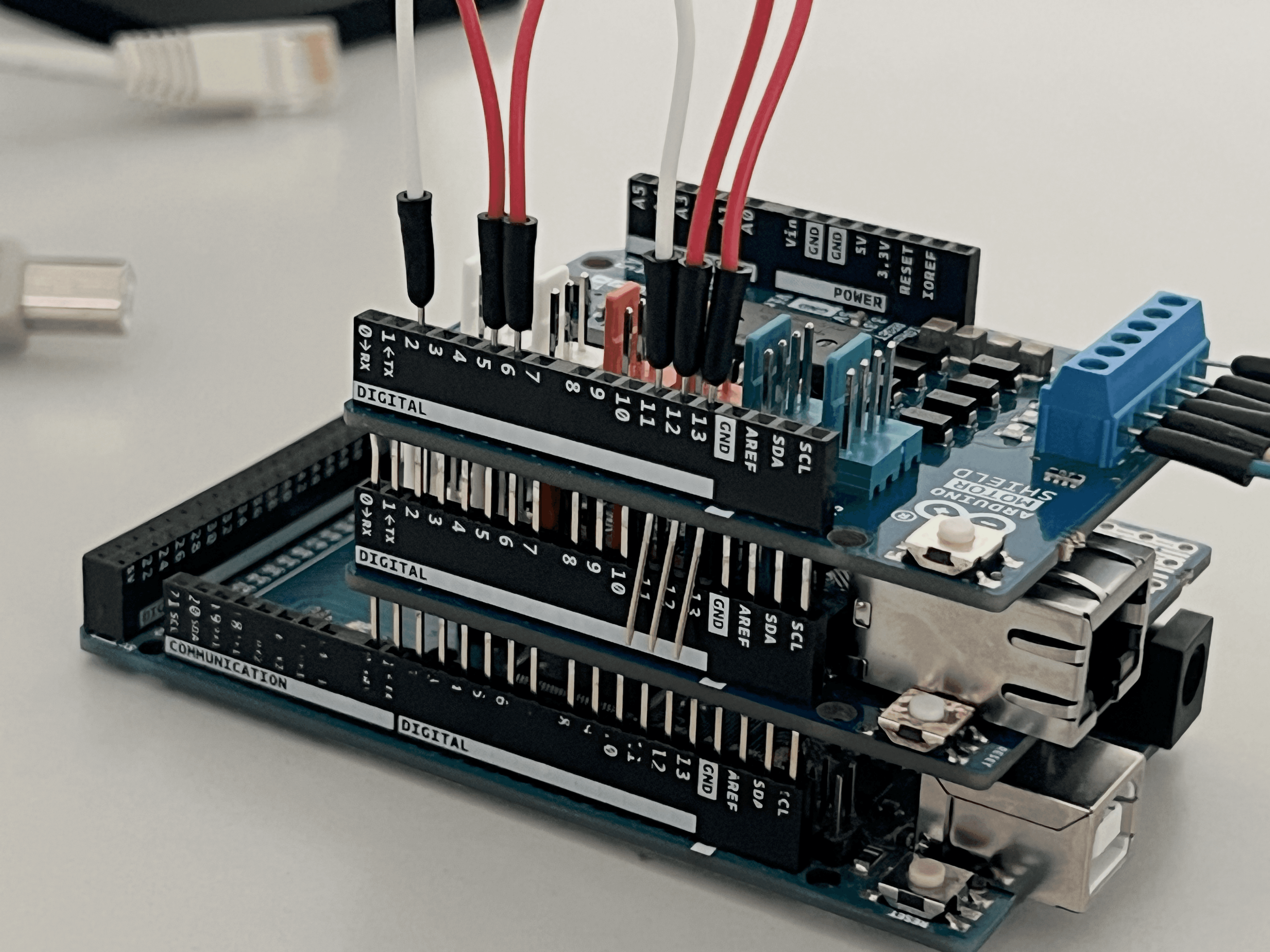
The central hardware unit for track control is an Arduino Mega 2560 stacked with two shields: an Arduino Ethernet Shield and an Arduino Motor Shield. Together, these three boards form the command station that physically connects to the track, supplies power to it, and transmits DCC signals to the trains.
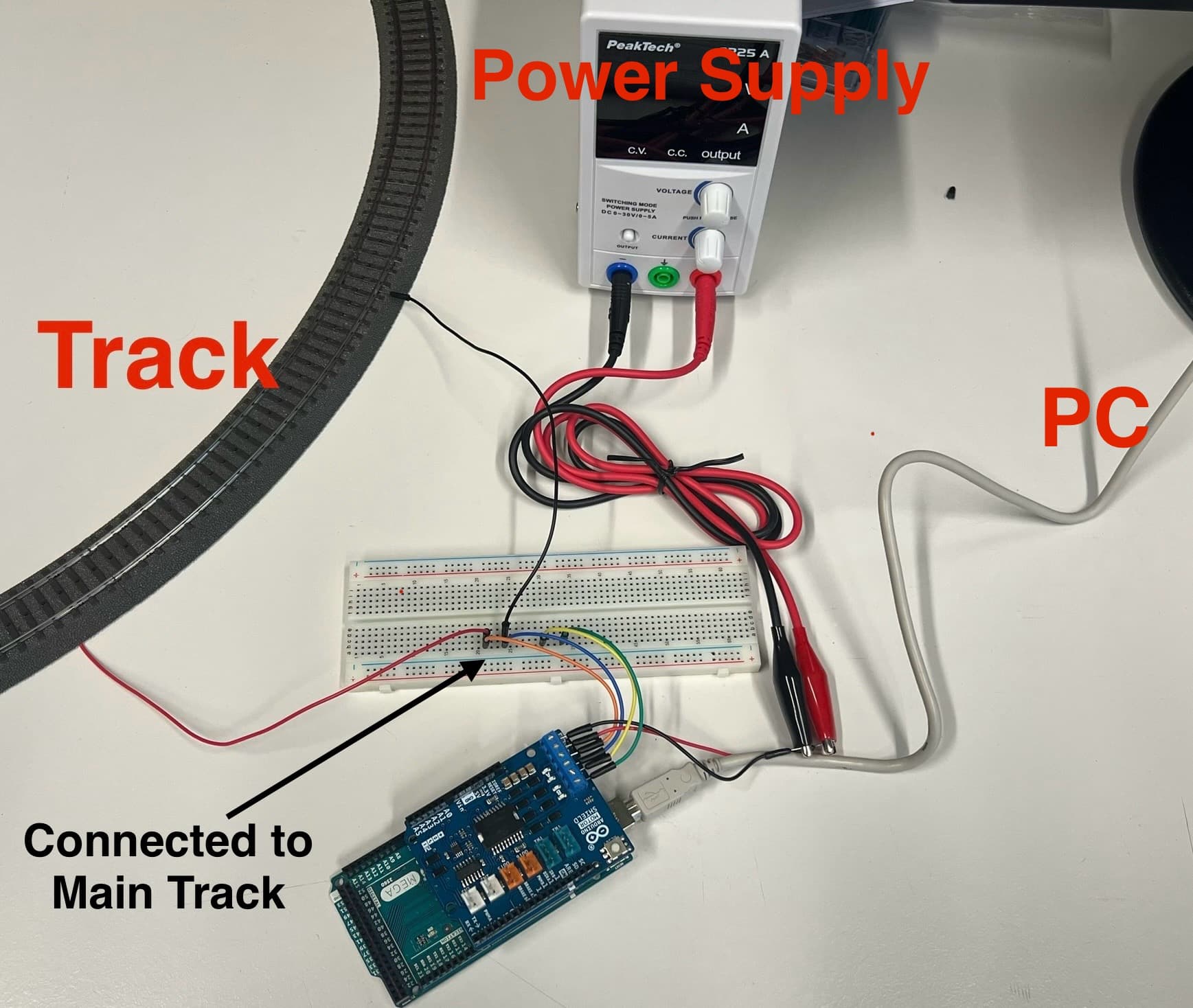
The Arduino Mega alone cannot supply the minimum 12V required for DCC operation, so the Motor Shield provides an independent power path to the track. The Motor Shield's A port connects to the main running track and its B port is reserved for the programming track. Currently a single track handles both roles via jumpers. The Ethernet Shield provides TCP/IP connectivity, allowing the software system to send DCC commands over the network to the Arduino, which then translates them into the appropriate signals on the track.
- Arduino Mega 2560: central controller, runs DCC-EX firmware
- Arduino Motor Shield: supplies 12V to the track, drives DCC signal via A and B ports
- Arduino Ethernet Shield 2 (W5500): TCP/IP network connectivity over RJ45
- Pin conflict resolved: Motor Shield pins 11/12/13 physically bent out and rerouted to 2/5/6 via jumpers
- Arduino powered via USB from PC; Motor Shield powered by separate external 12V supply
03. Train Detection: RP2350 & Reed Switches
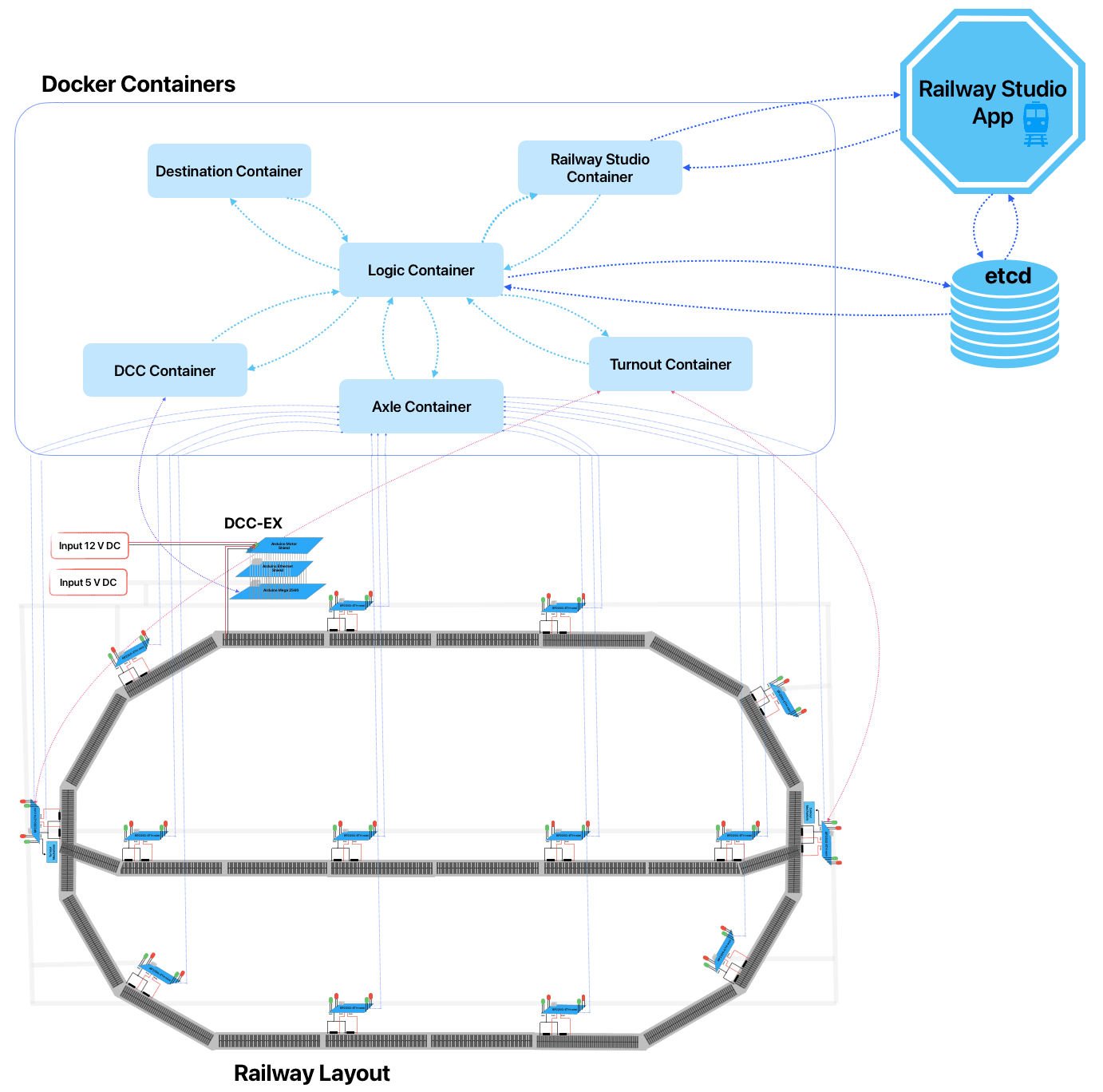
Train position detection is handled by RP2350-ETH MINI microcontrollers, one per track section, each connected to a pair of reed switches mounted along the rails. Magnets are attached to both the front and rear of each train. As a train passes a detection point, the magnets trigger the reed switches in sequence, giving the system both the presence of a train and its direction of travel.
Two reed switches per section are used deliberately. A single switch can only confirm that something passed; two switches in sequence reveal the direction of travel based on which one triggers first. This directional data is critical for the routing logic. The system needs to know not just where a train is, but where it is heading, in order to make correct stop, go, and turnout decisions.
The RP2350 transmits detection events over the real-time Ethernet network to the software system's Axle container. In addition to the reed switches, traffic light signals are installed at block boundaries: red when a block is occupied, clear when available. These serve as a realistic visual element on the layout and as a practical debugging aid during development and testing.
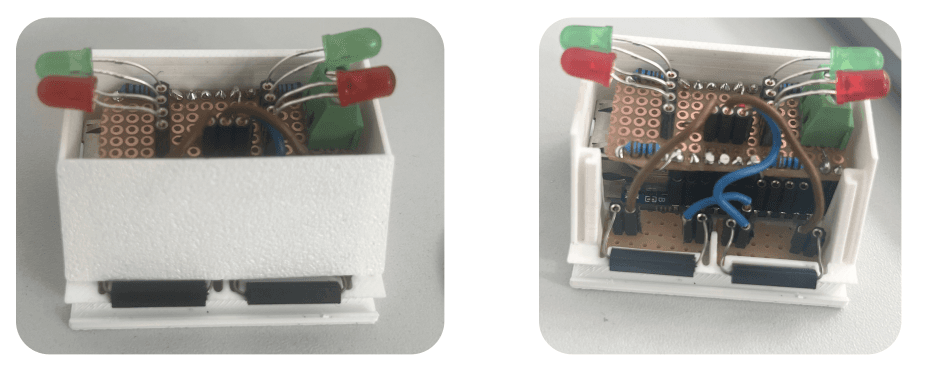
- RP2350-ETH MINI microcontroller per track section: handles detection and Ethernet reporting
- Two reed switches per section: detects both train presence and direction of travel
- Magnets on front and rear of each train trigger reed switches as it passes
- Direction of travel inferred from which switch triggers first
- Traffic light signals at block boundaries: visual block status indicator and debug aid
3D Printed Components
To mount the detection hardware cleanly onto the physical track layout, custom enclosures were designed in FreeCAD and 3D printed. Each enclosure houses an RP2350 microcontroller, the pair of reed switches, and the status LEDs in a single compact unit that attaches directly alongside the track. This made physical installation far more practical. Components that would otherwise be loose, fragile, and awkwardly positioned are secured in a purpose-built housing designed around the specific dimensions of the Märklin C-Track.

DCC-EX Firmware
DCC-EX is an open-source command station firmware that runs on Arduino hardware and generates the DCC track signal used to control model trains. It translates high-level commands (set speed, change direction, activate function, emergency stop) into the precise voltage waveforms that encode DCC packets onto the track. It exposes a straightforward text-based command protocol over USB or network, making it easy to integrate with external software systems.
In this project, DCC-EX runs on the Arduino Mega and serves as the bridge between the software decision layer and the physical trains. The DCC container in the software system translates internal routing commands into DCC-EX protocol messages and sends them to the Arduino over TCP. The Arduino then drives the Motor Shield to produce the correct signals on the track.
Software System
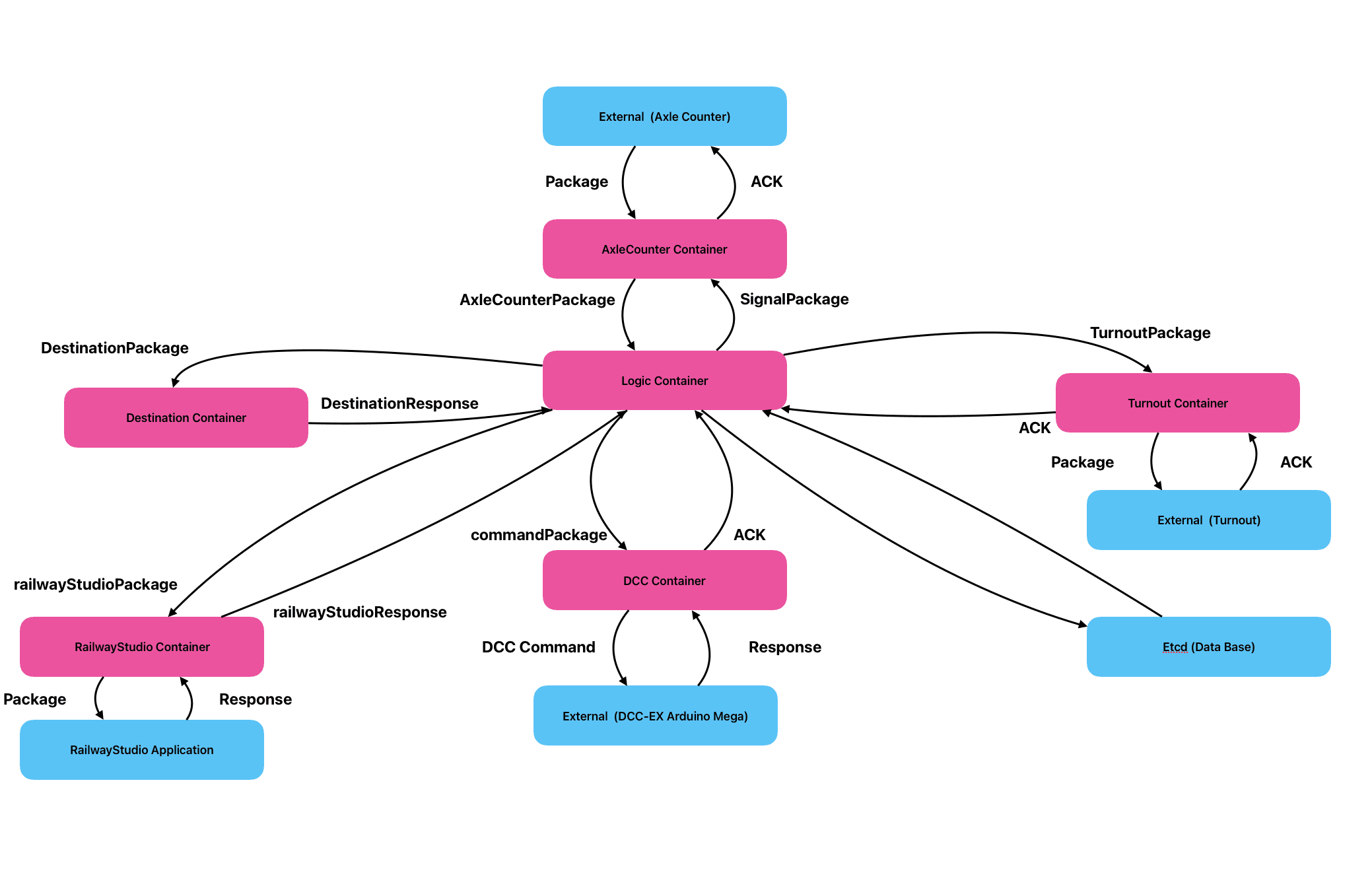
The control logic runs as a set of specialised microservices inside Docker containers, all written in Rust. Each container has a single clearly defined responsibility, and they communicate over a shared Docker bridge network (train-network). The system is orchestrated with Docker Compose, and all inter-container addresses and ports are configurable via environment variables, making the setup portable across different machines and network configurations without code changes.
Containers
The connection to Railway Studio is a deliberate architectural decision. The layout that the software system operates on is the same one created, stored, and visualised in Railway Studio. When the system is running, Railway Studio's monitor page connects through this container and displays live train positions and block occupancy states in real time. The same tool used to author the layout becomes the live operational display during runtime. Railway Studio and the RTS DCC Train System are two separate repositories that form one integrated system.
Technologies & Learnings
Applied
Newly learned