Published on 20TH SEP 2026
lazyTrigger
PublicA small USB device that turns repetitive computer tasks into a single tap of an RFID tag: unlock or lock the computer, press a shortcut, type text, open a link, or show a reminder. Built on a Raspberry Pi Pico 2 (RP2350) with an RFID-RC522 (MFRC522) reader.
Overview
lazyTrigger turns the things you do over and over on your computer into a single tap. A small device sits next to the keyboard, and when you hold a tag (a key fob, card or sticker) on it, it carries out whatever that tag is set to do. Each tag can have its own action or a short list of them, and everything is configured from a web page, with no programming. To the computer the device looks like an ordinary USB keyboard, so it works on Windows, macOS and Linux without drivers. This was my first project working with the RFID RC522 (MFRC522) reader.
- Tap a key fob to unlock the computer; take it away to lock it
- Tap a card to switch window layouts, and tap again for the next one
- Tap a sticker to type an email signature or open a daily dashboard
The Device
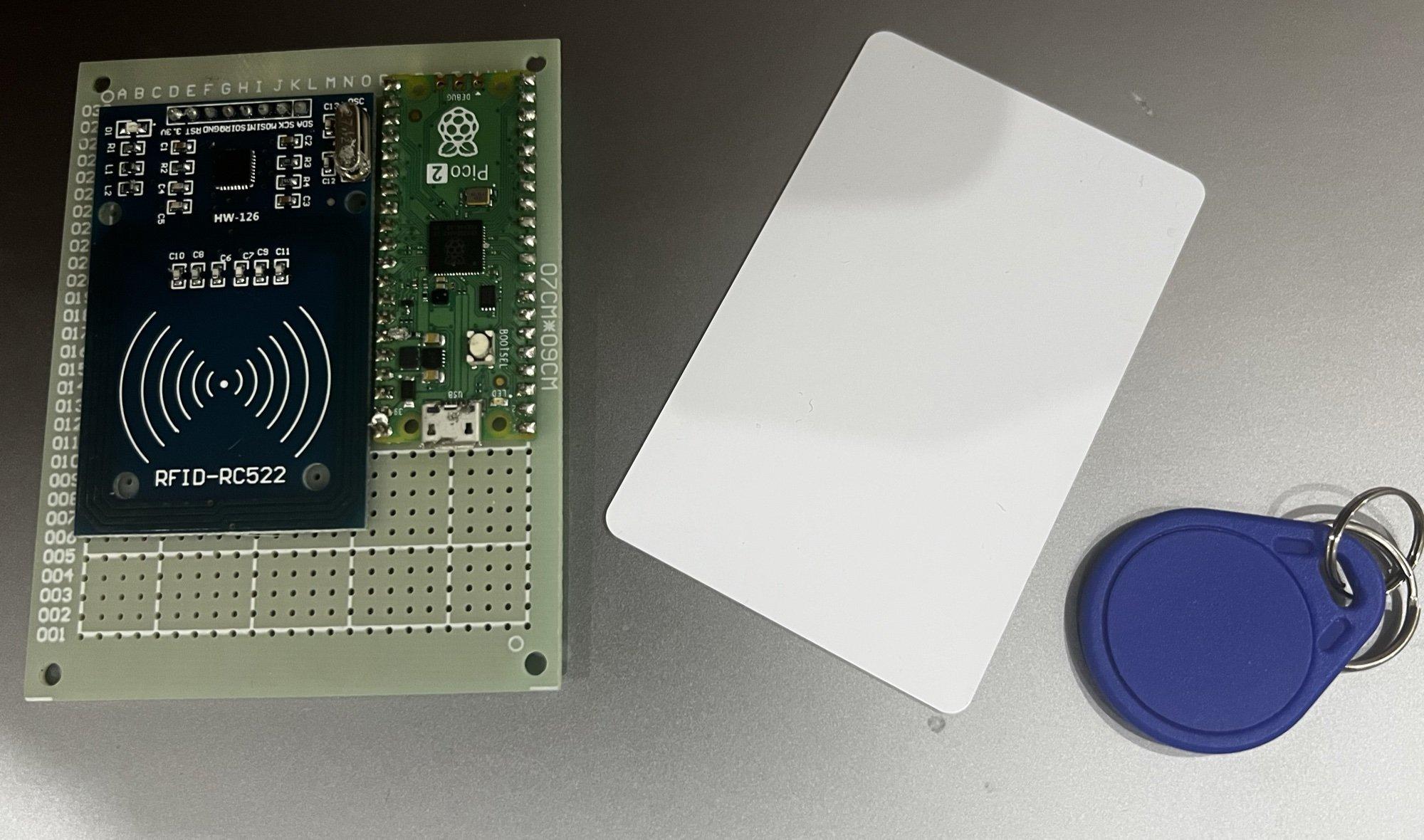
The hardware is a Raspberry Pi Pico 2 (RP2350 microcontroller) connected to an RFID-RC522 (MFRC522) reader over SPI, mounted side by side on a perfboard, plus MIFARE Classic tags such as a card and a key fob. It takes only eight connections and the parts cost a few dollars; the same build also works on a breadboard with jumper wires.
Wiring
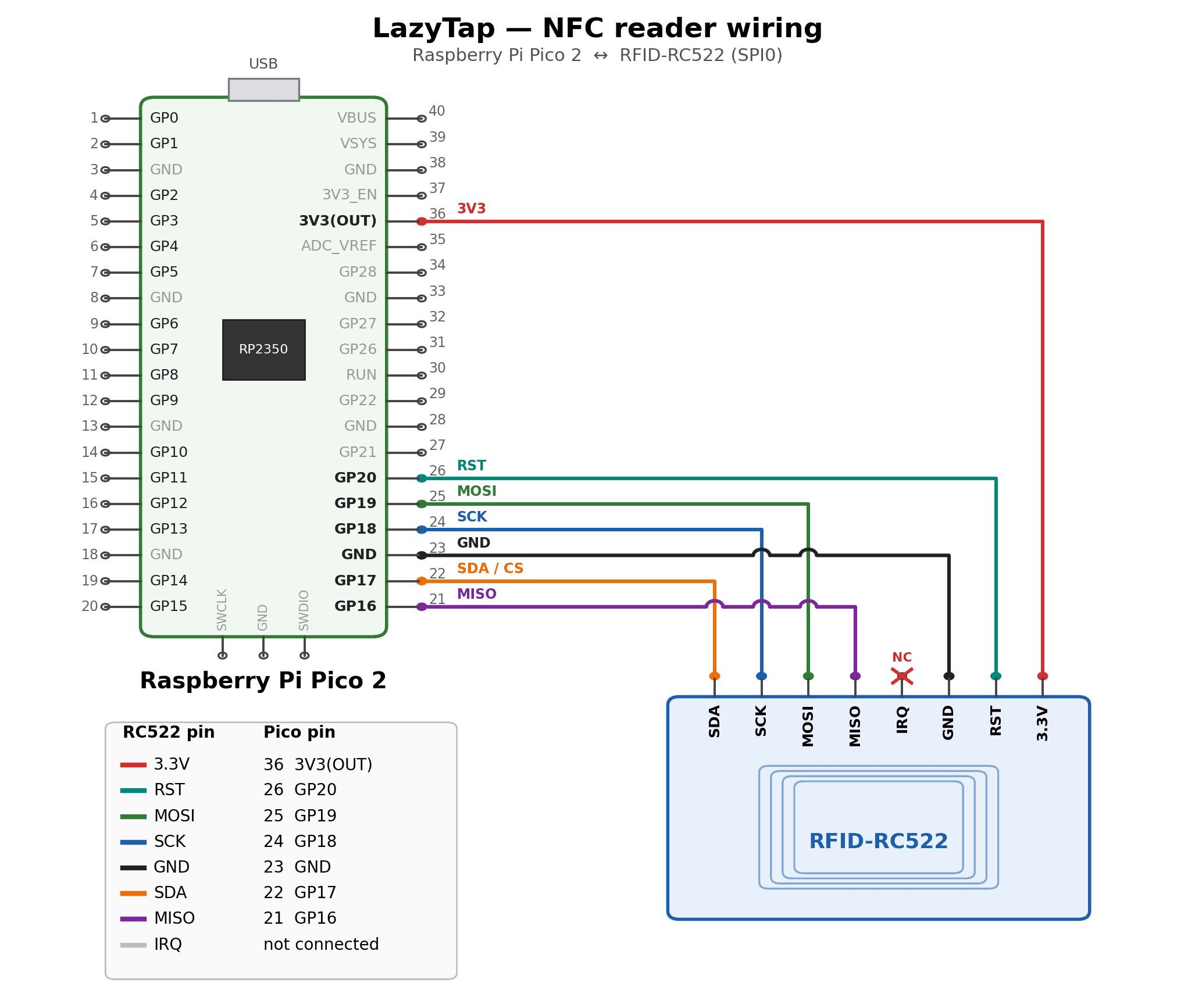
The reader is powered from the Pico 2's 3V3(OUT) pin and talks to it over SPI0: SCK on GP18, MOSI on GP19, MISO on GP16 and chip select (labelled SDA on the reader) on GP17, with GP20 driving its reset line. The IRQ pin is not used, so the firmware simply polls the reader for tags.
What a Tag Can Do
Each tag has an on_tap list of actions and an on_remove list that runs when the tag is taken away. A tag either runs its whole list in order on every tap (sequence), or steps through it one action per tap (cycle), which suits rotating through window layouts.
- Unlock: wakes the screen and types the login password, only when the screen is actually locked
- Lock: sends the screen-lock shortcut
- Keyboard shortcut: any chord of modifiers and a key
- Type text or a saved secret, optionally followed by Enter
- Open a link in the default browser
- Reminder: a notification counting days since or until a date
- Wait: a pause between steps in a sequence
How It Works
The firmware has no built-in idea of the operating system, of "lock" or "unlock", or of any specific shortcut. It only plays back a small set of generic actions. Every decision about what a tag should do is made in the browser configurator and sent to the device as plain data, so nothing computer-specific lives in code.
USB keyboard and serial channel
The Pico enumerates as two USB devices at once: a HID keyboard that plays back the tag actions, and a second CDC serial port that the configurator uses to read and change every tag live, with no reflashing. Tags are matched by UID, and the whole configuration is stored in config.json on the Pico's flash, so it survives power cycles and moves with the device to another computer.
Configurator and bridge
The configurator is a single web page. In Chrome and Edge it talks to the device directly through the Web Serial API. For other browsers, a small local Python bridge auto-detects the Pico, serves the page on 127.0.0.1, and also handles the things a keyboard cannot do: showing reminders, opening links and reporting whether the screen is locked. The bridge ships as a double-click app for macOS, Windows and Linux, built with PyInstaller by GitHub Actions, and can install the firmware onto a brand-new Pico from the page.
Security
The unlock password and saved secrets are AES-128-CBC encrypted with a key stored on the RFID tag itself, never on the Pico. A dump of the Pico's flash yields only ciphertext, and a tag on its own yields a key with nothing to decrypt. The values are write-only over serial, and changing the password requires proving the current one against a salted PBKDF2 check. lazyTrigger is meant for convenience, not as a security boundary: MIFARE Classic tags can be copied, so the unlock tag is treated like a house key.
Technologies & Learnings
Applied
Newly learned